How to Find Songs You Never Played in Apple Music
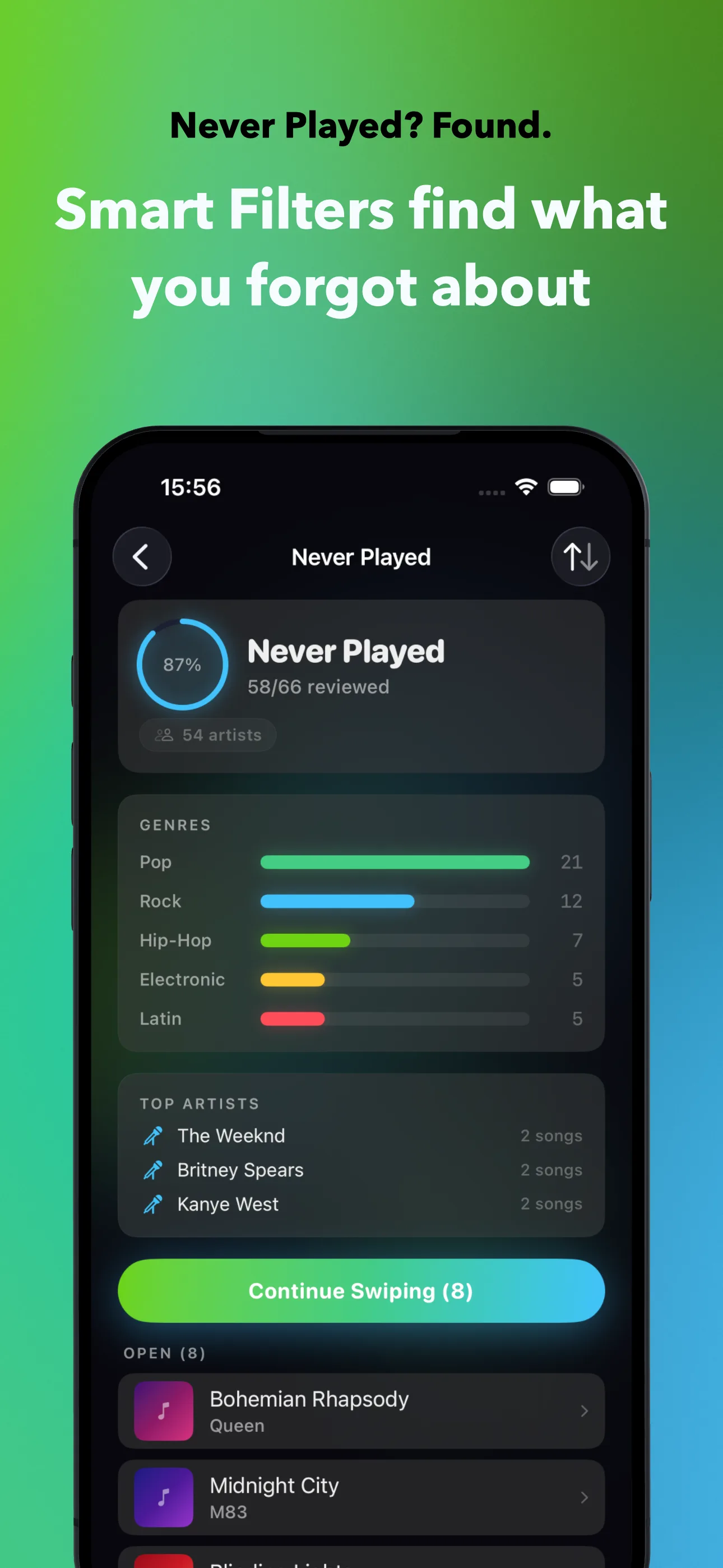
Apple Music does not make it easy to find songs you never listen to. On a Mac, open the Music app, switch to Songs view, add the Plays column, and sort by it; every song with zero plays rises to the top. You can also build a Smart Playlist with the rule Plays is 0, plus Date Added is not in the last 30 days, so brand-new songs are not flagged before you have had a chance to hear them. The iPhone Music app has no Plays column and no Smart Playlist editor, so sorting by play count is not possible there. SongSweep fills that gap with two Smart Filters: Never Played, for songs with zero plays, no last-played date, and at least 30 days in your library, and Forgotten, for songs added over a year ago that you still have not played, or have not played in the past year. Preview each one, then keep, sort out, or bookmark it.
Open your Apple Music library and scroll for a minute. Chances are you will pass dozens of songs you added years ago and never actually played once. Whole albums, entire shared playlists, songs that came along for the ride when you synced an old iTunes library.
None of them are hurting anything by sitting there, but they do skew your recommendations and make your library feel bigger and messier than it needs to be. Here is how to actually find them, on Mac and on iPhone.
Why do unplayed songs pile up in your library?
Most unplayed songs do not arrive one by one. You buy or add a full album because you liked a single track, and the other eleven songs just sit there. A friend shares a playlist, you add the whole thing to your library, and you only ever return to the two songs you already knew.
Apple Music's own settings add to this. With "Add Playlist Songs" turned on, every track from every playlist you follow gets added to your library automatically, whether you asked for it or not. A handful of shared playlists later, you have hundreds of songs you never chose one at a time.
Old syncs pile on more. If you ever migrated from iTunes, restored a backup, or merged libraries across devices, you likely brought years of half-forgotten music along with you. None of it disappears by itself, and Apple gives no bulk way to remove it; for the full cleanup approach, see how to clean up your Apple Music library, song by song.
How do you find unplayed songs on Mac?
The Music app on Mac has a real advantage here: it shows play counts and lets you sort by them. Open Music, switch to your Songs view, right-click any column header, and turn on "Plays". Click that new column once and every song with zero plays floats to the top of the list.
For something you can reuse, build a Smart Playlist instead. Set one rule to "Plays is 0" and add a second rule, "Date Added is not in the last 30 days", so songs you only just added are not judged before you have had a fair chance to hear them. Save it, and the playlist keeps itself up to date as your library changes.
How do you find unplayed songs on iPhone?
Here is the honest answer: you cannot, not with the Music app alone. iPhone has no Plays column, and it cannot create or edit Smart Playlists at all, that feature only exists on Mac. Scrolling through a few thousand songs hoping to remember which ones you never touched is not a real strategy, and it gets less accurate the bigger your library is.
This is the exact gap I built SongSweep to close. It reads your library through Apple's MusicKit and turns that data into two Smart Filters that do the sorting for you. Never Played finds every song with zero plays, no last-played date, and at least 30 days since it was added, so brand-new additions are not judged too early.
Forgotten goes a step further: songs that have been in your library for 12 months or more and were either never played, or not played in the past 12 months. Between the two filters you get both the songs you missed early on and the ones you used to like and quietly stopped playing.
What should you do with the songs you find?
Do not sort out everything with zero plays on sight. Some of those songs are genuinely good, you just never got around to them. In SongSweep, every song plays a short preview before you decide, so you can actually judge it instead of guessing from the title.
If a song is worth keeping, swipe right; nothing changes in Apple Music, it is just marked as reviewed so it will not come up again. If you are not sure yet, swipe up to bookmark it and come back later. If it clearly is not your taste anymore, sort it out: SongSweep moves it to a "SongSweep - Sorted Out" playlist and sends a "Suggest Less" rating through the Apple Music API, so it stops shaping your recommendations too. That is the same signal behind why your recommendations feel off in the first place.
Apple does not let any app, including SongSweep, delete a song from your library. If you want the sorted-out songs gone for good, open the Music app, open the "SongSweep - Sorted Out" playlist, select the songs and delete them from your library there.
Mac Smart Playlist vs SongSweep: which finds unplayed songs better?
Both approaches read the same play-count data, they just differ in where you can use them and how much you do by hand. Here is the quick side-by-side before you pick one.
If you only ever use a Mac, the Smart Playlist is free and built in, and it is a fine way to check once in a while. If most of your listening happens on iPhone, which is true for most people, Never Played and Forgotten in SongSweep do the same job without a computer, song by song instead of a flat list. Both are free to use; get SongSweep or read why apps cannot delete songs from Apple Music for the full picture.
| Method | Where | Finds | Effort |
|---|---|---|---|
| Mac Smart Playlist | Mac only | Plays is 0, added 30+ days ago | Manual review, no preview, one-time setup |
| SongSweep Never Played | iPhone, Watch, CarPlay | 0 plays, no last-played date, 30+ days in library | Swipe with audio preview |
| SongSweep Forgotten | iPhone, Watch, CarPlay | 12+ months in library, never played or unplayed for 12+ months | Swipe with audio preview |
Frequently Asked Questions
How many songs in my library have never been played?
There is no universal number, it depends entirely on your library and how it grew. If you migrated from iTunes, follow shared playlists, or add full albums for one track, the count is often higher than you would guess. The only way to know for sure is to check: sort by Plays on Mac, or run the Never Played filter in SongSweep on iPhone.
Can I see play count on iPhone?
Not in the Music app. iPhone has no Plays column and no Smart Playlist editor, both are Mac-only. SongSweep reads the same play data through MusicKit and surfaces it as the Never Played and Forgotten Smart Filters, so you get the same result without needing a computer.
Should I delete songs I never played?
Not automatically. Some unplayed songs are genuinely good, you just never got to them, so preview before you decide. For songs that clearly are not for you, sort them out with SongSweep, which marks them "Suggest Less" so they stop shaping your recommendations, and delete them from the Sorted Out playlist in the Music app if you want them fully gone.
What is the difference between Never Played and Forgotten in SongSweep?
Never Played finds songs with zero plays that have been in your library for at least 30 days. Forgotten looks further back: songs added 12 months or more ago that were either never played or have not been played in the past 12 months. Together they cover both new misses and old songs you quietly stopped playing.
Does Apple Music's Smart Playlist work on iPhone?
No. Smart Playlists can only be created and edited in the Music app on Mac. You can play one that was already built on Mac and synced to your iPhone, but you cannot create or change one from the phone itself.