 SongSweep

Sort your Apple Music library in CarPlay
SongSweep is not a voice-only app in the car. It runs on the CarPlay screen, with lists, covers and buttons.
You listen as usual. When a song comes on that you do not want, you tap once.

Pick what to play
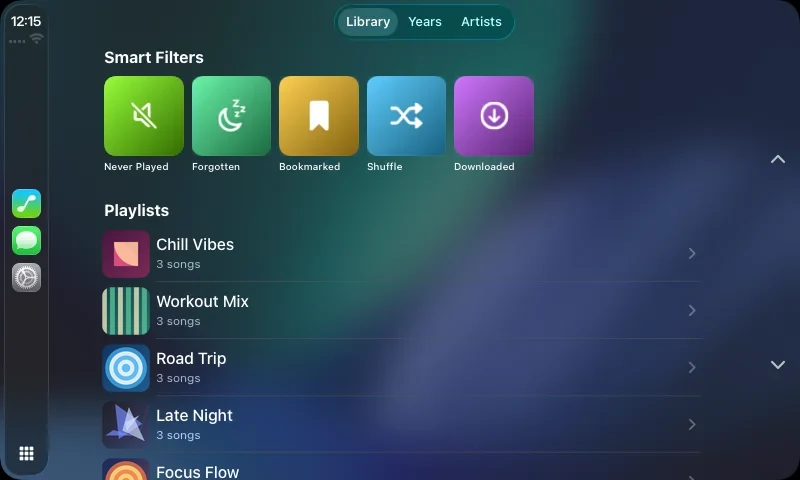
Three tabs: Playlists, Years and Artists.
The Playlists tab has Shuffle, Never Played, Forgotten, Saved and Downloaded, plus your playlists.
Downloaded plays only songs stored on your iPhone, so it saves mobile data.
Decide while it plays
- Thumbs down sorts out the song that is playing.
- Skip keeps it and plays the next one, also from the steering wheel.
- Up Next lists the songs that follow.
- Save keeps it for later.
- Star adds it to your Apple Music Favorites.
- Shuffle starts a new random order.
Every decision is saved the same way as on the iPhone. A notice tells you when a song cannot play.
- Slow OrchardKept
- Quiet EnginesSorted out
- Hollow BellSaved
- Amber LinesOpen
Free in the car
CarPlay is free. Skipping forward counts as Keep. Every Keep, Sort Out or Save counts toward the same 25 songs a day as on the iPhone. Past the limit, the music keeps playing and nothing is saved. Pro removes the limit.
Before you drive
Set up SongSweep on your iPhone once and allow access to Apple Music.
Keep your eyes on the road. Sort only when it is safe.
More on the other devices is on the features page.
Short answers
Do I need to look at the screen?
No more than for any music app. One tap per song.
Does CarPlay cost extra?
No. It is part of the free app.
Does SongSweep delete songs in the car?
No. Sorted-out songs go to a playlist in Apple Music and get Suggest Less.
Start with the songs you never play.
Free on the App Store. iPhone with iOS 18.0 or later.